

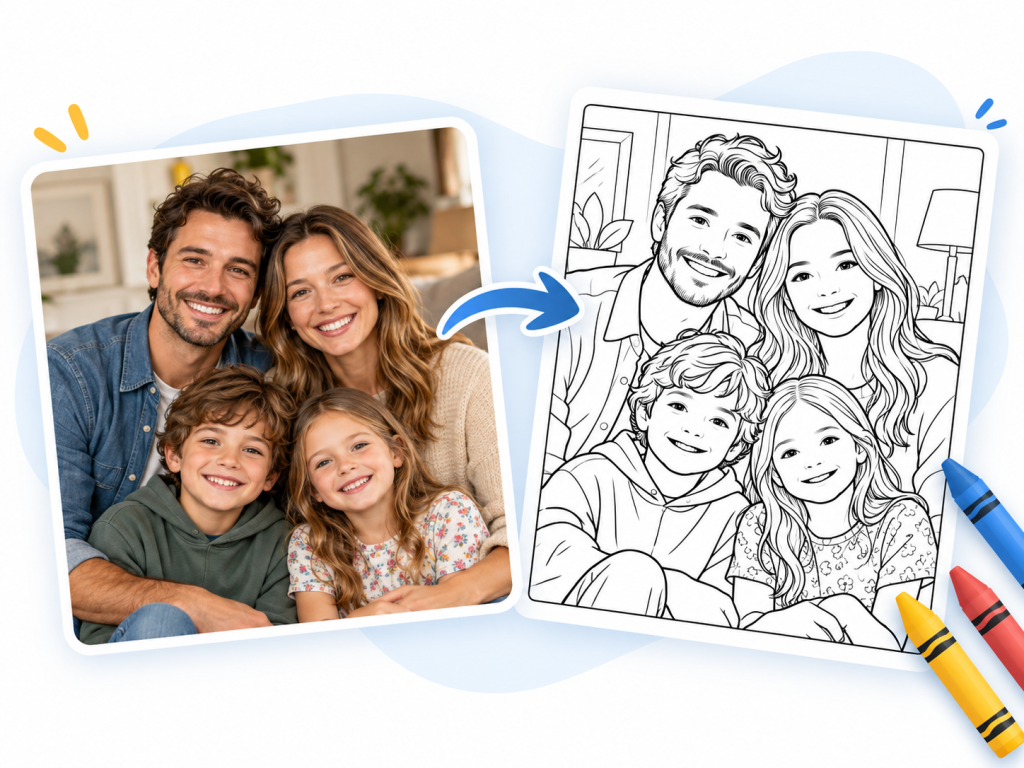
What if your next coloring page came from you? A vacation photo, a portrait of your cat, your child’s drawing or simply an idea you can’t stop thinking about: with Just Color Studio, our new AI-powered creation tool, you can now turn them into real coloring pages.
In just a few clicks, you choose your starting point, an art style, a level of detail and a format. The Studio takes care of the rest: your coloring page is ready to print or to color online. Every account gets one free coloring page per week. Credit packs are now available to everyone for extra creations and adjustments.

Two ways to start: an image or an idea
The Studio offers two starting points, depending on what you have in mind.
- From an image. Upload a photo or a drawing, and the Studio turns it into a coloring page. Perfect for a travel memory, a pet, a family home or your kids’ latest masterpiece.
- From a description. Simply describe your idea: the subject, the setting, the little details that matter. You have 1,200 characters to describe your scene. Short on inspiration? The Studio suggests a few ideas, such as a fox in the forest, a fairy-tale house or wildflowers.
With a description, you can also add an optional reference image to guide the mood or the composition. PNG, JPEG and WebP files are accepted, as well as HEIC depending on your browser. Photos can be up to 50 MB: they are automatically resized before uploading.
Nine worlds to give your coloring page character
The same subject can take a thousand forms. Your cat can become a manga character, an elegant Art Nouveau silhouette or the heart of a mandala. The Studio offers nine art styles:
- Classic: a faithful, balanced rendering for any subject.
- Simple & Easy: large shapes, perfect for relaxing or coloring with little ones.
- Kawaii: round, adorable characters in the Japanese spirit.
- Comic Book: bold outlines and the energy of comics.
- Manga: the dynamism and expressive lines of Japanese comics.
- Art Nouveau: flowing botanical curves and ornaments inspired by Mucha.
- Art Deco: geometric lines and the elegance of the 1920s.
- Mandala: a circular, meditative composition, available for coloring pages created from a description only.
- Cozy: a soft, warm atmosphere, like a Sunday under a blanket.
Do these styles speak to you? Check out our article on Art Nouveau and Art Deco and our free printable mandalas.
Just the right amount of detail, in the right format
Some days, you want large areas to fill in at a relaxed pace. Other days, you want to lose yourself in intricate patterns. The Studio lets you choose the level of detail on a scale from 1 to 5, from “very simple” to “very detailed”. Level 3, intermediate, is selected by default: a good balance for a first creation.
Final step: your page format. Choose A4 portrait for a tall subject, or A4 landscape for a wider view. If you start from an image, the format is preselected automatically based on its orientation, and you can always change it.
Print it, color it online or get it by email
Once your coloring page is created, you choose how to enjoy it:
- Print it using the PDF file, to color with pencils, markers or watercolors.
- Color it online right in your browser, with our recently upgraded online coloring tool: zoom up to 800%, custom colors, paint bucket and brush.
- Get it by email: we send a link to your creation to the email address of your Just Color account, so you can find it later at no extra credit.
Your creations are private: they stay in your account and only you can open the files, once logged in. If you start from a family photo, nobody else will see it.
And if you’re proud of the result once it’s colored, share it in our member creations gallery!
One free coloring page every week, with credits to create more
Every Just Color account gets one free coloring page per week, no credit card required. Your free allowance renews every Monday. Simply log in to your free account, or create one with Google or your email address.
Want to keep creating without waiting until next week? Credit packs are available to all members, directly in the Studio. Choose a one-time purchase, with no subscription: 10 credits for €2.99, 30 credits for €6.99 or 60 credits for €12.99. Larger packs offer a lower price per credit.
1 credit = 1 additional coloring page or 1 adjustment. Change a detail, simplify the background or add an element to an existing creation. Each new proposal uses one credit, and previous versions stay in your account. Downloading and coloring online do not use extra credits.
Our tips for a great coloring page
Here are a few tips to get great results and make the most of your free weekly coloring page.
- Choose a sharp, well-lit photo with a clearly visible main subject. Avoid busy backgrounds.
- Be specific in your description: the subject, the place, the season, the mood, two or three important details. “A red fox sitting in an autumn forest, surrounded by mushrooms and falling leaves” will give a richer result than “a fox”.
- Match the style to the subject: Kawaii or Simple & Easy for a gift to a child, Art Nouveau or Mandala for a relaxing session, Cozy for a warm indoor scene.
- Adapt the level of detail to the purpose: 1 or 2 for little ones or a quick break, 4 or 5 for long, stress-relieving coloring sessions.
A few ideas to get you started: your pet’s portrait as a mandala, your house in Art Deco style, your grandparents’ wedding photo, a personalized birthday card, or your kids’ favorite drawing turned into a real coloring page.
Frequently asked questions
Is Just Color Studio free?
Yes. Every account gets one free coloring page per week, renewed on Monday, with no credit card required. To create more or adjust your creations, you can buy packs of 10, 30 or 60 credits, with no subscription. Credit purchases are available to all members.
Do I need an account to use the Studio?
You can prepare your idea without logging in. To launch the creation, a free Just Color account is required: it also lets you find your coloring pages at any time.
Are my photos and creations visible to other members?
No. Your creations stay private in your account, and opening the files requires you to be logged in.
Which image formats can I upload?
PNG, JPEG and WebP, as well as HEIC depending on your browser. Photos up to 50 MB are accepted and automatically resized before uploading.
Can I edit my coloring page after it’s created?
Yes. You can request an adjustment after creating your page: simplify the background, change a detail or add an element. Each adjustment proposal uses one credit, including adjustments to a free coloring page. Your previous versions stay in your account.
Can I color my creation without printing it?
Yes. Your coloring page can be colored online, on a computer, tablet or smartphone.
Your turn to create!
For years, Just Color has offered you thousands of free coloring pages. With the Studio, you get to imagine the next one: a memory, a passion, a gift, a dream to bring to life in color.
Create your coloring page with Just Color Studio: choose an image or describe your idea, and let the magic happen.